Jun 23, 2026
HTB Sherlock: Logjammer - Windows Event Log Analysis

In this Sherlock, Forela-Security provides a collection of Windows Event Logs from a system suspected of user tampering. The goal is to analyze the logs, identify suspicious activity, and reconstruct what the user cyberjunkie did on the workstation.
This investigation focuses on Windows Event Log analysis across several log sources, including Security logs, Windows Firewall logs, Microsoft Defender logs, PowerShell logs, and System logs.
Rather than treating each artifact as an isolated answer, I approached this as a small DFIR investigation: establish the first successful user logon, then review the activity that followed.
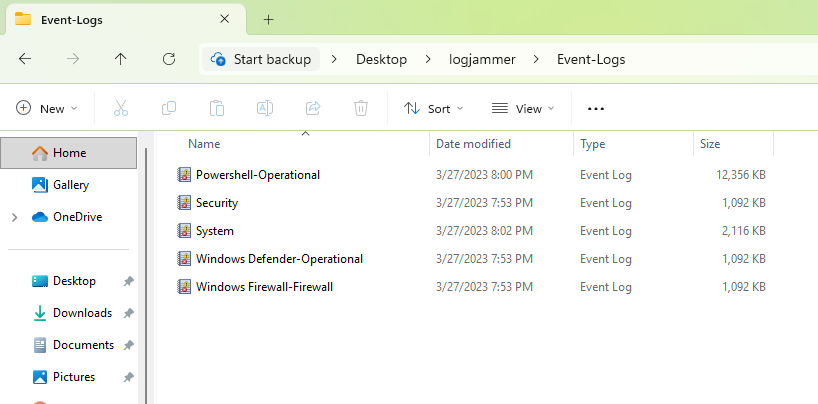
Evidence Provided
The investigation included several exported Windows Event Log files. The most relevant logs reviewed were:
Security.evtxSystem.evtxWindows Firewall-Firewall.evtx- Microsoft Defender logs
- PowerShell operational logs
Since these were exported .evtx files, the logs could be opened directly in Event Viewer. For the initial login question, I used PowerShell to quickly filter the Security log and convert timestamps to UTC.
First Successful Logon
The first step was identifying when the cyberjunkie user first successfully logged into the workstation.
Successful logons are recorded in the Windows Security log with Event ID 4624. Since I was looking for a user logging into the computer directly, I filtered for Logon Type 2, which represents an interactive logon.
I used the following PowerShell command:
Get-WinEvent -Path .\Security.evtx -FilterXPath "*[System[(EventID=4624)]]" |
Where-Object {
    $xml = [xml]$_.ToXml()
    $data = @{}

    foreach ($item in $xml.Event.EventData.Data) {
        $data[$item.Name] = $item.'#text'
    }

    $data["TargetUserName"] -eq "cyberjunkie" -and
    $data["LogonType"] -eq "2"
} |
Select-Object TimeCreated,
@{Name="UTC";Expression={$_.TimeCreated.ToUniversalTime()}},
Id
This returned the successful interactive logons for cyberjunkie.
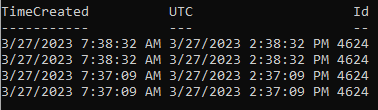
The first successful interactive logon occurred at:
03/27/2023 11:37:09 UTC
This timestamp became the starting point for the rest of the investigation. After identifying when the user logged in, I reviewed the remaining logs for activity occurring after that time.
Firewall Rule Tampering
Next, I reviewed the Windows Firewall event log.
The user tampered with the firewall settings on the system. In the Windows Firewall logs, Event ID 2004 indicates that a firewall rule was added.
Using Event Viewer, I filtered the firewall log for Event ID 2004 and reviewed the rule creation events after the cyberjunkie login.
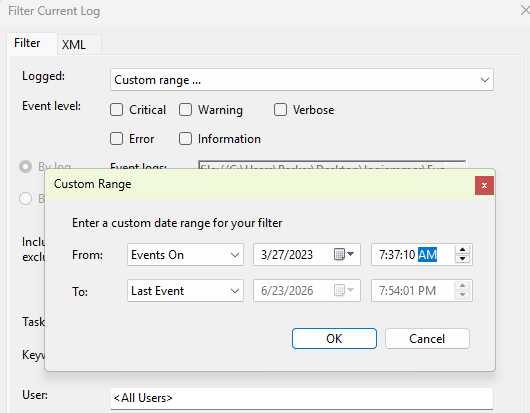
The first relevant firewall rule added after the user logged in was named:
Metasploit C2 Bypass
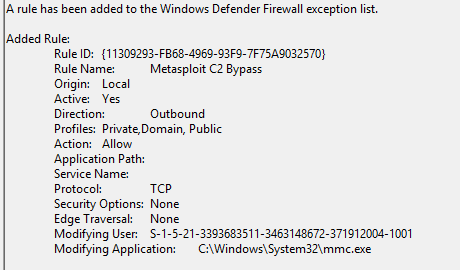
This rule name is immediately suspicious. A firewall rule referencing Metasploit or C2 activity suggests an attempt to allow command-and-control or offensive tooling traffic through the host firewall.
The direction of the firewall rule was:
Outbound
Outbound firewall rules are especially interesting during an investigation because they may allow malware, reverse shells, beacons, or other post-exploitation tooling to communicate out of the system.
Audit Policy Change
The user also changed the audit policy on the computer.
Audit policy changes are recorded in the Security log with Event ID 4719. These events are important because changing audit policy can reduce visibility or modify what security-relevant activity is logged.
Using Event Viewer, I filtered the Security log for Event ID 4719.
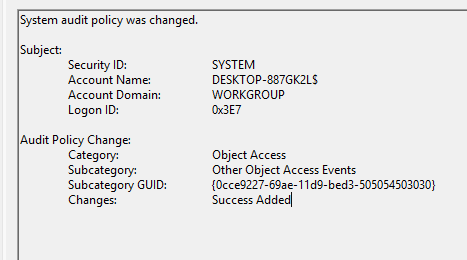
The changed audit policy subcategory was:
TODO: Add audit policy subcategory
In a real environment, unexpected audit policy changes should be reviewed carefully. On their own, they may be administrative activity. But in this case, the audit policy change occurred alongside firewall tampering and other suspicious user actions.
Scheduled Task Creation
I then reviewed the Security log for scheduled task creation.
Windows records scheduled task creation with Event ID 4698. Scheduled tasks are commonly used by administrators for automation, but attackers also use them for persistence or repeated execution.
Using Event Viewer, I filtered the Security log for Event ID 4698.
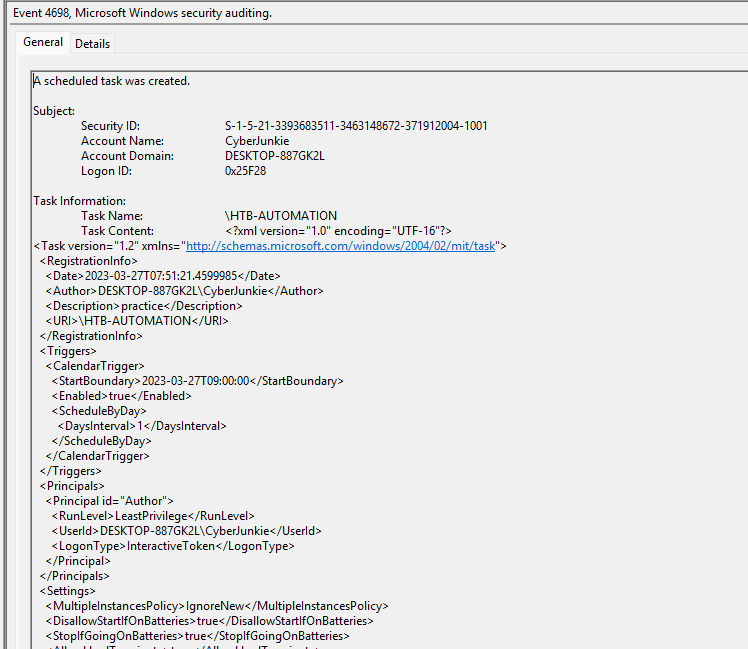
A scheduled task was created by the user cyberjunkie.
The task name was:
TODO: Add scheduled task name
The task was configured to execute the following file:
TODO: Add full scheduled file path
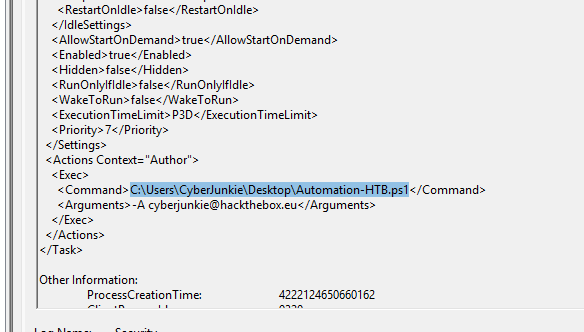
The command arguments were:
-A cyberjunkie@hackthebox.eu
This is a useful artifact because scheduled task events provide both user context and execution details. In an actual investigation, I would correlate this with process creation logs, file creation timestamps, PowerShell logs, and network activity around the same time.
Microsoft Defender Detection
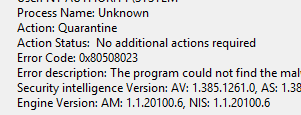
The antivirus running on the system also identified a threat and performed an action on it.
To investigate this, I reviewed the Microsoft Defender event logs and filtered for Event ID 1117, which indicates that Defender detected malware and took action.
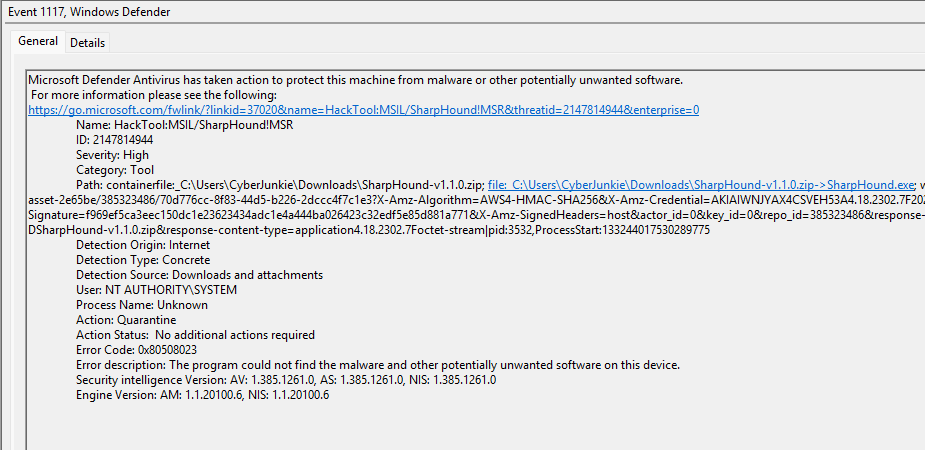
The tool identified as malware was:
SharpHound
The full path of the detected file was:
C:\Users\CyberJunkie\Downloads\SharpHound-v1.1.0.zip
SharpHound is commonly used to collect Active Directory relationship data for BloodHound analysis. While it can be used legitimately by defenders and penetration testers, it is also commonly associated with domain enumeration during offensive operations.
The action taken by Microsoft Defender was:
TODO: Add Defender action taken
In a real SOC environment, this detection would raise several follow-up questions:
- Was SharpHound only downloaded, or was it executed?
- Were any BloodHound collection files created?
- Did the user have authorization to run domain enumeration tooling?
- Were there additional tools downloaded or executed?
- Was there any related outbound network activity?
PowerShell Activity
The user also used PowerShell to execute commands.
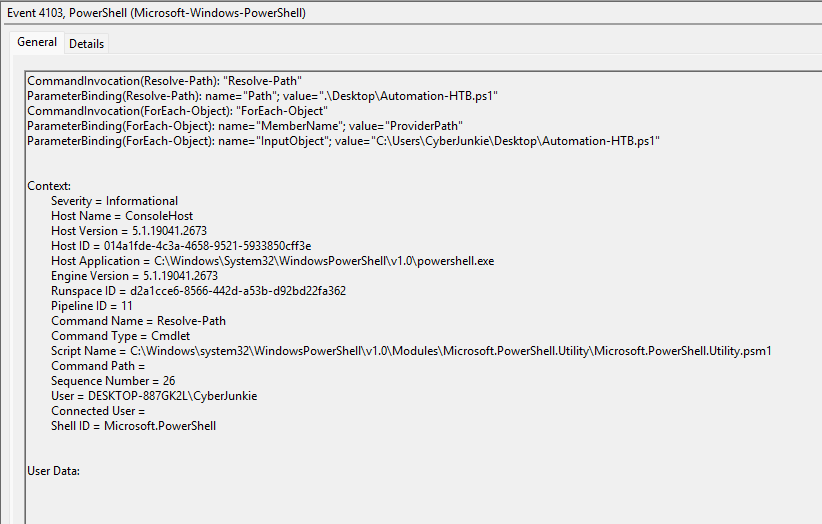
PowerShell activity can be especially useful during Windows investigations because Event IDs 4103 and 4104 may capture module activity and script block content.
I reviewed the PowerShell logs and found Event ID 4103, which showed PowerShell activity involving a file on the user’s desktop.
I then reviewed Event ID 4104, which showed the actual script block content.
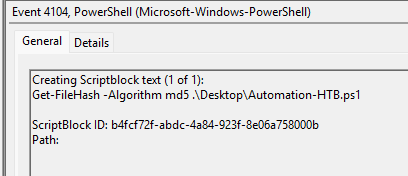
The PowerShell command executed by the user was:
TODO: Add exact PowerShell command
This matters because PowerShell logs can show direct evidence of user or attacker intent. Even when other telemetry is limited, script block logging may capture the actual commands being executed.
Event Log Clearing
Finally, I reviewed the System log for evidence of log clearing.
Windows records event log clearing with Event ID 104. This is a high-value event during incident response because clearing logs may indicate an attempt to remove evidence.
Using Event Viewer, I filtered the System log for Event ID 104.
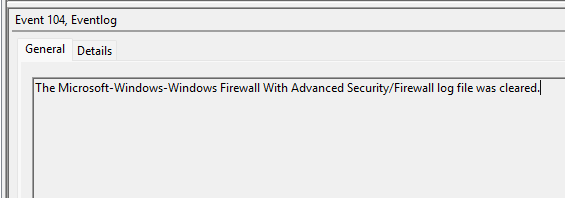
The event log file cleared was:
TODO: Add cleared event log file
Log clearing does not automatically prove malicious intent, but in this case it is highly suspicious. It occurred after several other concerning actions, including firewall modification, audit policy changes, scheduled task creation, Defender detection of SharpHound, and PowerShell execution.
Timeline of Activity
The activity observed in the logs can be summarized as follows:
| Time | Activity | Evidence |
|---|---|---|
| 03/27/2023 11:37:09 UTC | cyberjunkie successfully logged in interactively | Security.evtx, Event ID 4624, Logon Type 2 |
| After logon | Firewall rule added: Metasploit C2 Bypass | Windows Firewall log, Event ID 2004 |
| After logon | Firewall rule direction identified as Outbound | Windows Firewall log |
| After logon | Audit policy changed | Security.evtx, Event ID 4719 |
| After logon | Scheduled task created by cyberjunkie | Security.evtx, Event ID 4698 |
| After logon | Scheduled task configured with argument -A cyberjunkie@hackthebox.eu | Security.evtx, Event ID 4698 |
| After logon | Defender detected SharpHound | Microsoft Defender log, Event ID 1117 |
| After logon | PowerShell command execution observed | PowerShell logs, Event IDs 4103 and 4104 |
| After logon | Event log cleared | System.evtx, Event ID 104 |
Key Findings
The investigation identified the following activity:
- The user
cyberjunkiesuccessfully logged in interactively at03/27/2023 11:37:09 UTC. - A suspicious outbound firewall rule named
Metasploit C2 Bypasswas added. - The system audit policy was modified.
- A scheduled task was created by
cyberjunkie. - The scheduled task included the argument
-A cyberjunkie@hackthebox.eu. - Microsoft Defender detected
SharpHoundin the user’s Downloads folder. - PowerShell command execution was observed.
- An event log was cleared.
Detection Opportunities
This Sherlock highlights several useful detection opportunities for defenders.
Suspicious Firewall Rule Creation
Firewall rule creation should be monitored, especially when rule names contain suspicious terms such as:
metasploit
c2
bypass
shell
reverse
payload
beacon
Relevant event:
Windows Firewall Event ID 2004 - Firewall rule added
Audit Policy Changes
Unexpected audit policy changes should be reviewed because they may reduce logging visibility.
Relevant event:
Security Event ID 4719 - System audit policy was changed
Scheduled Task Creation
Scheduled task creation should be monitored, especially when tasks are created by unusual users or execute files from user-writable paths.
Common suspicious paths include:
C:\Users\<user>\Desktop
C:\Users\<user>\Downloads
C:\Users\<user>\AppData
C:\ProgramData
C:\Windows\Temp
Relevant event:
Security Event ID 4698 - Scheduled task created
Offensive Tooling Detected by Antivirus
Defender detections involving tools such as SharpHound should be triaged carefully. Even if the tool can be used legitimately, its presence may indicate domain enumeration or post-compromise activity.
Relevant event:
Microsoft Defender Event ID 1117 - Threat detected and action taken
PowerShell Script Block Logging
PowerShell logs are valuable because they can capture commands and script block content.
Relevant events:
PowerShell Event ID 4103 - Module logging
PowerShell Event ID 4104 - Script block logging
Event Log Clearing
Event log clearing should be treated as a high-priority detection because it may indicate anti-forensic activity.
Relevant event:
System Event ID 104 - Event log cleared
Lessons Learned
Logjammer was a good reminder that Windows Event Logs can tell a complete story when multiple log sources are reviewed together.
A single firewall rule change, scheduled task, Defender alert, or PowerShell event may not be enough to fully understand what happened. But when those artifacts are placed into a timeline, the activity becomes much clearer.
In this case, the investigation began with a successful interactive logon by cyberjunkie. From there, the logs showed firewall tampering, audit policy changes, scheduled task creation, Defender detection of SharpHound, PowerShell execution, and event log clearing.
The biggest takeaway from this Sherlock was the value of timeline-driven analysis. Once the first successful logon was identified, each follow-on event could be reviewed in context and tied back to the same suspicious user activity.